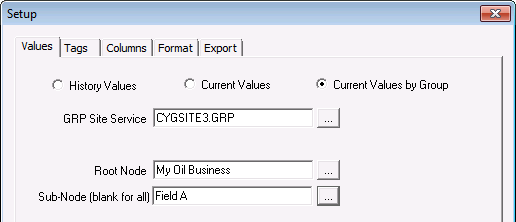
The Current Values by Group report is based on points that belong to a group node (or sub node) and UDCs. The report retrieves a single value for each point. The value can be the point’s current value or a historical value.
To Set Up a Current Values by Group Report
Note: Optionally, to retrieve a historical value instead of a current value, double-click the Time cell for the item and enter the timestamp in the Value at Time box. The value closest to without exceeding the timestamp will be returned.
| Property | Description |
|---|---|
|
GRP Site Service |
The name of the Group Service from which to retrieve the group information. Use … to select the service. |
|
Root Node |
The name of a Navigation Root Node. Use … to select the node. |
|
Sub Node |
The name of a sub node. Use … to select the sub-node. If blank, the report will include all sub nodes of the selected Root Node. Using this property, you can limit the report to a particular attribute value. For example, if the Root Node includes a "State" attribute, and one of the attribute values is "UT" (for Utah), if you specify UT as the Sub Node, the report will be limited to only points in the group for which the point’s facility has its State attribute as UT. |
|
|
|

